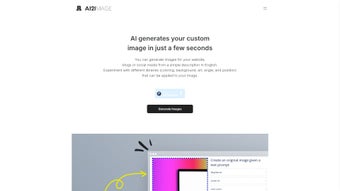

Download AI2image – AI‑Powered Image Generator, Free Trial, Secure Web App
Overview
AI2image is a cutting‑edge, browser‑based graphics solution that transforms plain text prompts into high‑resolution, production‑ready images within seconds. Built on OpenAI’s industry‑leading DALL‑E diffusion model, the platform merges powerful deep‑learning capabilities with a clean, drag‑free interface that requires no prior design experience. Whether you are a freelance marketer needing a fresh banner for a client, a small‑business owner looking to create eye‑catching social‑media posts, or a content creator seeking unique illustrations for a video, AI2image offers a seamless workflow that eliminates the traditional bottlenecks of manual design.
The service operates entirely in the cloud, meaning the heavy AI calculations are performed on secure, encrypted servers while the user’s device simply renders the results. This architecture guarantees fast generation times—typically 5‑15 seconds per image—while keeping the client‑side resource footprint minimal. New users are welcomed with a 7‑day free trial that unlocks every premium style library, unlimited generation, and priority support, allowing a risk‑free exploration of the tool’s full capabilities.
After the trial, flexible subscription tiers (Basic, Pro, Enterprise) let individuals and teams scale usage according to their volume and support needs. Because the platform runs on any modern web browser, it works flawlessly on Windows, macOS, Linux, Android, and iOS devices, delivering a consistent experience whether you are at a desktop workstation, a coffee‑shop laptop, or a mobile tablet. Security is baked into the service: all data transfers are encrypted via HTTPS, prompts are transiently stored only for processing, and the generated assets are yours to download, edit, or publish without additional licensing constraints.
In short, AI2image combines speed, security, and cross‑platform flexibility into a single, user‑friendly AI art generator that can dramatically cut down the time and cost of creating visual content.
Key Features That Set AI2image Apart
AI2image distinguishes itself through a rich set of capabilities that cater to both casual creators and professional teams. Each feature is designed to maximize productivity while preserving creative freedom. Below is a detailed look at the most impactful functionalities, accompanied by real‑world usage scenarios that illustrate their value.
- Instant Text‑to‑Image Generation: Input a concise description, select a visual style, and receive a fully rendered image in under 15 seconds, ideal for rapid prototyping.
- Extensive Style Libraries: Choose from curated collections such as Blog Banners, Social Media Templates, E‑commerce Mockups, Infographic Elements, and Creative Illustrations, each optimized for specific dimensions and branding needs.
- Customizable Output Sizes: Generate images in standard advertising formats (e.g., 1200×628 for Facebook ads) or define custom pixel dimensions for unique placements like mobile app splash screens.
- Secure Cloud Processing: All image creation occurs on encrypted servers that comply with GDPR and CCPA, ensuring user privacy and data protection.
- 7‑Day Free Trial with Full Access: Test every premium feature—including advanced style packs and priority rendering—without providing credit card details.
- Tiered Subscription Plans: Flexible pricing (Basic, Pro, Enterprise) accommodates freelancers, agencies, and large organizations, each offering differentiated generation limits, API access, and dedicated support.
- One‑Click Export Options: Download generated assets instantly in PNG or JPEG formats, with optional lossless compression for web‑optimized delivery.
- Cross‑Platform Browser Compatibility: Works on any up‑to‑date browser (Chrome, Edge, Firefox, Safari) across Windows, macOS, Linux, Android, and iOS, eliminating the need for OS‑specific installations.
- Continuous Monthly Updates: The development team releases new style packs, model enhancements, and workflow improvements every month, keeping the tool ahead of design trends.
- Collaboration & Sharing Tools: Generate shareable links for team review, embed images directly into project management platforms, and export asset metadata for streamlined asset management.
Installation, Usage Instructions & Compatibility
Getting Started – No Installation Required
AI2image is delivered as a Software‑as‑a‑Service (SaaS) solution, which means there is absolutely no software to download or install. Simply open your preferred browser, navigate to the official AI2image website, and click “Sign Up.” The registration process requests a valid email address and a password; after confirming the verification email, you gain immediate access to the dashboard where all generation tools reside.
Step‑by‑Step Workflow
- Select a Mode: Choose a style library that aligns with your project—e.g., “Blog Banner” for website headers or “Social Media” for Instagram posts.
- Enter a Prompt: Write a clear, descriptive sentence. For example, “A minimalist sunrise over a calm lake with pastel colors and a subtle silhouette of a kayak.”
- Adjust Settings (Optional): Modify image dimensions, style intensity, color palette, or add custom seed values for reproducibility.
- Generate: Press the “Generate” button. The AI processes the request on secure cloud servers and returns the image within 5‑15 seconds.
- Review & Refine: If the first output needs tweaking, edit the prompt or use the “Regenerate” button for alternative variations.
- Download or Share: Click “Download” to save the file locally, or generate a shareable link for collaboration with teammates.
System Requirements & Operating System Support
Because AI2image runs entirely in the browser, the only requirements are a modern web browser with HTML5 and JavaScript support and an active internet connection. The platform has been tested on the following operating systems and browsers:
- Windows 10/11 – Edge, Chrome, Firefox
- macOS Monterey and later – Safari, Chrome, Firefox
- Linux (Ubuntu, Fedora, etc.) – Chromium‑based browsers
- Android 9+ – Chrome, Firefox
- iOS 14+ – Safari, Chrome
Since all heavy processing occurs on remote servers, the client device experiences negligible CPU or GPU load, making AI2image equally usable on low‑end tablets, older laptops, or high‑performance workstations.
Pros & Cons – A Balanced Look
Before committing to a subscription, it’s useful to weigh the strengths and limitations of AI2image. The following lists summarize user‑feedback and real‑world testing outcomes.
Pros
- Lightning‑fast AI‑driven image creation that slashes traditional design time.
- Secure, privacy‑first architecture leveraging OpenAI’s trusted DALL‑E model.
- Zero‑installation, browser‑only access across all major operating systems.
- Broad library of pre‑built style packs for marketing, blogging, e‑commerce, and artistic projects.
- Generous 7‑day free trial that unlocks every premium feature.
- Scalable subscription plans suitable for freelancers, agencies, and enterprise teams.
- Monthly updates introduce new styles, model improvements, and workflow enhancements.
- Collaboration features such as shareable links and asset metadata export.
- One‑click download in PNG or JPEG with optional compression for web use.
- Responsive support team with priority options for higher‑tier subscribers.
Cons
- Requires a stable internet connection; offline generation is not possible.
- Subscription pricing may be steep for occasional hobbyists who need only occasional images.
- Output quality heavily depends on the precision of the user’s text prompt; vague inputs can produce unexpected results.
- Fine‑grained artistic control (e.g., brush strokes, layer manipulation) is limited compared to professional design suites like Adobe Photoshop.
- Advanced style packs and higher generation limits are gated behind higher‑tier plans.
- API access is reserved for Pro and Enterprise tiers, which may limit integration for smaller developers.
Frequently Asked Questions
Below you will find answers to the most common inquiries about AI2image, covering everything from trial eligibility to data security. This FAQ is structured with Schema.org markup to help search engines surface the information directly in search results.
Is AI2image really free to try?
Yes. New users receive a 7‑day free trial that unlocks all premium features, including unlimited image generation and access to every style library. No credit card is required to start the trial.
What AI model powers AI2image?
AI2image utilizes OpenAI’s DALL‑E diffusion model, a state‑of‑the‑art generative engine trained on billions of image‑text pairs, delivering high‑fidelity, diverse visual outputs.
Can I use the generated images for commercial purposes?
Absolutely. All images created under a paid subscription are cleared for commercial use, allowing you to place them in advertisements, product listings, client deliverables, and more without additional licensing fees.
Do I need any special hardware to run AI2image?
No special hardware is required. Because the heavy AI processing occurs on remote servers, any device with a modern web browser and a stable internet connection—be it a laptop, desktop, tablet, or smartphone—can generate high‑quality images.
How does AI2image protect my data and privacy?
All communications are encrypted via HTTPS, and OpenAI’s DALL‑E API complies with GDPR and CCPA standards. User prompts are stored only for the duration of image generation and are not retained long‑term.
Conclusion – Should You Download AI2image?
AI2image delivers on the promise of rapid, high‑quality visual creation without the steep learning curve associated with traditional design software. Its reliance on OpenAI’s DALL‑E ensures diverse, modern output, while the cloud‑first architecture guarantees universal accessibility across Windows, macOS, Linux, Android, and iOS devices. The 7‑day free trial provides a genuine, no‑risk opportunity to explore the full suite of style libraries, making the platform especially attractive to freelancers, small businesses, and marketing teams that need fresh visuals on a tight schedule.
While a subscription is required for ongoing use, the time saved on manual graphic design—often measured in hours per project—frequently outweighs the recurring cost, particularly for teams that generate multiple assets weekly. The primary drawbacks are the need for an internet connection and the fact that nuanced artistic control remains limited compared to full‑featured desktop editors. However, for most content‑creation workflows that prioritize speed, scalability, and cost‑effectiveness, AI2image stands out as a compelling, secure, and future‑proof solution.
If you’re ready to streamline your visual production, accelerate your marketing campaigns, and explore the creative possibilities of AI‑generated art, click the button below to start your free trial. Experience the power of AI2image firsthand and decide whether a paid plan aligns with your workflow and budget.



.png)



